本文属于机器翻译版本。若本译文内容与英语原文存在差异,则一律以英文原文为准。
了解 Amazon DocumentDB Amazon 资源名称 (ARN)
您在 Amazon 中创建的资源分别使用 Amazon 资源名称 (ARN) 进行唯一标识。对于某些 Amazon DocumentDB(与 MongoDB 兼容)操作,您必须通过指定 Amazon DocumentDB 资源的 ARN 来唯一标识该资源。例如,当您向资源中添加标签时,必须提供该资源的 ARN。
构建 Amazon DocumentDB 资源的 ARN
您可以使用以下语法为 Amazon DocumentDB 资源构建 ARN。Amazon DocumentDB 共享 Amazon DocumentDB 共享 Amazon Relational Database Service 共享 Amazon RocumentDB 的格式。Amazon DocumentDB ARN 包含rds而不是docdb.
arn:aws:rds:region:account_number:resource_type:resource_id
| 区域名称 | 区域 | 可用区(计算) |
|---|---|---|
美国东部(俄亥俄) |
|
3 |
美国东部(弗吉尼亚北部) |
|
6 |
美国西部(俄勒冈) |
|
4 |
南美洲(圣保罗) |
|
3 |
亚太地区(孟买) |
|
3 |
亚太地区(首尔) |
|
4 |
亚太地区(新加坡) |
|
3 |
亚太地区(悉尼) |
|
3 |
亚太地区(东京) |
|
3 |
加拿大(中部) |
|
3 |
中国(北京)区域 |
|
3 |
中国(宁夏) |
|
3 |
欧洲(法兰克福) |
|
3 |
欧洲(爱尔兰) |
|
3 |
欧洲(伦敦) |
|
3 |
欧洲(米兰) |
|
3 |
欧洲(巴黎) |
|
3 |
| Amazon GovCloud (US) |
|
3 |
Amazon DocumentDB 架构将存储和计算分开。对于存储层,Amazon DocumentDB 会在三个之间复制 6 个数据副本。Amazon可用区 (AZ)。上表中列出的 AZ 是指,您可以在给定区域中预置计算实例时使用的 AZ 数。例如,如果要在 ap-northeast-1 中启动 Amazon DocumentDB 集群,将在三个 AZ 之间的 6 个方向复制存储,但仅在两个 AZ 中具有计算实例。
下表显示在构建特定 Amazon DocumentDB 资源的 ARN 时应使用的格式。Amazon DocumentDB 共享 Amazon RDS ARN 的格式。Amazon DocumentDB ARN 包含rds而不是docdb.
| 资源类型 | ARN 格式/示例 |
|---|---|
|
实例 ( |
|
|
集群 ( |
|
|
集群参数组 ( |
|
|
安全组 ( |
|
|
集群快照 ( |
|
|
子网组 ( |
|
查找 Amazon DocumentDB 资源 ARN
您可以 Amazon DocumentDB 用Amazon Web Services Management Console或者Amazon CLI.
使用 Amazon Web Services Management Console
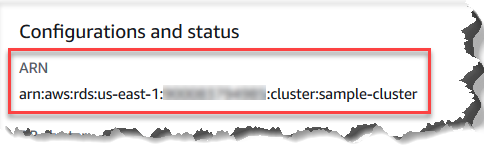
要使用控制台查找 ARN,请导航到要获取其 ARN 的资源,然后查看该资源的详细信息。
例如,您可以在集群的详细信息窗格中获取集群的 ARN,如以下屏幕截图所示。
使用 Amazon CLI
要 ARN 用Amazon CLI对于特定的 Amazon DocumentDB 资源,请使用describe该资源的操作。下表显示了每个 Amazon CLI 操作,以及与操作配合使用以获取 ARN 的 ARN 属性。
| Amazon CLI 命令 | ARN 属性 |
|---|---|
|
|
|
|
|
|
|
|
|
|
|
|
|
|
|
|
|
|
|
|
|
|
|
|
例 - 查找集群的 ARN
以下 Amazon CLI 操作可查找集群 sample-cluster 的 ARN。
对于 Linux、macOS 或 Unix:
aws docdb describe-db-clusters \
    --db-cluster-identifier sample-cluster \
    --query 'DBClusters[*].DBClusterArn'
对于 Windows:
aws docdb describe-db-clusters ^
    --db-cluster-identifier sample-cluster \
    --query 'DBClusters[*].DBClusterArn'
此操作的输出将类似于下文(JSON 格式)。
[
    "arn:aws:rds:us-east-1:123456789012:cluster:sample-cluster"
]
例 - 查找多个参数组的 ARN
对于 Linux、macOS 或 Unix:
aws docdb describe-db-cluster-parameter-groups \
   --query 'DBClusterParameterGroups[*].DBClusterParameterGroupArn'
对于 Windows:
aws docdb describe-db-cluster-parameter-groups ^
   --query 'DBClusterParameterGroups[*].DBClusterParameterGroupArn'
此操作的输出将类似于下文(JSON 格式)。
[
    "arn:aws:rds:us-east-1:123456789012:cluster-pg:custom3-6-param-grp",
    "arn:aws:rds:us-east-1:123456789012:cluster-pg:default.aurora5.6",
    "arn:aws:rds:us-east-1:123456789012:cluster-pg:default.docdb3.6"
]